

In this post we will explore what the HTTP protocol is, how it works, and how you can analyse HTTP messages in your browser. The HTTP protocol is already very well documented, so instead of a full discussion of the varying HTTP semantics, we will focus on an overview, while offering relevant resources to extend your understanding.
HTTP is the core protocol for transmitting data over the Web. What started as a simple project of barely one and a half pages of documentation quickly turned into a de-facto standard used not just by web applications, but by any Internet-connected device.
How does the HTTP protocol work?
At its fundamental level, HTTP uses another protocol called TCP/IP as a transmission mechanism. Simply put, when a user visits a website, their web browser establishes a TCP connection to the server (port 80 for HTTP, 443 for HTTPS) and sends the user’s request.
While multiple HTTP requests can be sent through a single TCP connection, each HTTP request is independent, which makes HTTP a stateless protocol. This means that the web server cannot distinguish the sender of a request. It treats every request as a unique and autonomous interaction.
So, the browser and web server communicate by exchanging messages, as shown in Fig 1. One purpose of HTTP is to define and standardise the format of these messages. The communication process works as follows: a client (usually a web browser) sends a message called HTTP request to the server based on the user interaction with the web application. The server processes the request and responds with a message called HTTP response, which is further displayed to the user.

Note
In reality, there are more computers between a browser and the server handling the request: there are routers, modems, and more. Thanks to the layered design of the Web, these are hidden in the network and transport layers. HTTP is on top of the application layer. Although important to diagnose network problems, the underlying layers are mostly irrelevant to the description of HTTP.
So, a more accurate representation of this process would look like this:

HTTP messages
HTTP was conceived as a simple, text-based protocol. All messages are in a human-readable format, which facilitates debugging and testing (yeah, that’s great for us ethical hackers). The structure of both the request and the response is divided into two sections: headers and body.
A header is a key-value pair message that can enclose much information, such as the date, content-type, the IP address of the issuer, the name of the web server, and many others. Headers sit one per line, and an empty line marks the end of the headers and the start of the body. Below is an example of request headers vs. response headers:
Accept: text/html
Accept-Language: de
Translated into English, these headers are equivalent to saying “Hey web server, I want the information in HTML format. Also, I would like the information in the German language, if possible.”
Content-Length: 281
Set-Cookie: lastReadArticle=1234; expires=Tue, 28-Jul-2021 14:04:00 GMT;
These response headers are equivalent to saying, “Hey browser, here is the content you requested. Its length is 281 octets. Also, set a cookie with the name lastReadArticle and value 1234, that expires on Tue, 28-Jul-2021.”
The body of an HTTP message is the message itself. It can be plain-text, HTML, XML, JSON or a set of key-value pairs (e.g., username=admin&password=supersecurepassword).
HTTP requests
Below is an example of an HTTP request:
GET /docs/index.html HTTP/1.1
Host: www.uphack.io
Accept: */*
Accept-Language: en-us
Accept-Encoding: gzip, deflate
User-Agent: Mozilla/5.0 (Macintosh; Intel Mac OS X 10_15_4)
(blank line)
The first line of every HTTP request contains three elements, each delimited by a whitespace character:
- The HTTP method (or verb) that tells the server what action a user wants to perform.
GET is usually used to retrieve information, while POST to send information to the server (such as contact form-data). But these are not the only HTTP methods available. HTTP also supports some lesser-used verbs such as PUT, DELETE, HEAD, TRACE, and OPTIONS.
- The path of the requested resource. In our example, that is /docs/index.html
- The HTTP version. The versions are 0.9, 1.0, 1.1, 2 and 3. While 0.9 and 1.0 are still supported by popular web servers such as Nginx or Apache, all modern web applications use HTTP/1.1 or later, for significantly better performance and capabilities.
Apart from these three elements, there are also some interesting HTTP headers.
- Host: specifies the domain name of the server.
- Accept: describes the content types that the browser wants in the response.
- Accept-Language: describes the language in which the content should be displayed (e.g., en-gb for British English, de for German). If the server can’t find the requested language, it will simply ignore this header.
- Accept-Encoding: specifies the content encoding scheme that should be used to compress the response.
- User-Agent: provides details about the client (i.e., your web browser and the operating system).
You can find all the HTTP headers your browser can send, along with a short description, in the MDN reference.
HTTP response
This is what an HTTP response looks like:
HTTP/1.1 200 OK
Server: Apache
Last-Modified: Sun, 31 May 2020 01:43:58 GMT
cf-request-id: 0309ff745a0000d208e51e5200000001
Accept-Ranges: bytes
Content-Length: 12
Vary: Accept-Encoding
Content-Type: text/plain

Hello World!
Each HTTP response starts with the HTTP version, a status code, and a status message. The status code indicates whether the request has been successful or not. For instance, if the requested resource exists, the server will return 200 OK, as in the above example. On the other hand, if the resource does not exist or the user is not allowed to access it, a 404 Not Found or a 403 Forbidden status is returned. There are many other status codes, and they are grouped into five classes:
- Informational 1xx (e.g., 100 Continue, 101 Switching Protocols)
- Successful 2xx (e.g., 200 OK, 201 Created, 202 Accepted)
- Redirection 3xx (e.g., 301 Moved Permanently, 302 Found)
- Client Error 4xx (e.g., 401 Unauthorized, 403 Forbidden, 404 Not Found)
- Server error 5xx (e.g., 500 Internal Server Error, 502 Bad Gateway)
The entire list of HTTP status codes and their usage is defined in RFC 9110, section 15.
After the first line, the web server responds with several HTTP headers, followed by a new line and the body. The purpose of response headers is to offer additional information about the response. In our example, we can see the Server, Content-Type, and Content-Length.
Analysing HTTP requests
Head over to any website and open your browser’s developer tools. Then look for a tab called Network. This is how it should look in Google Chrome.
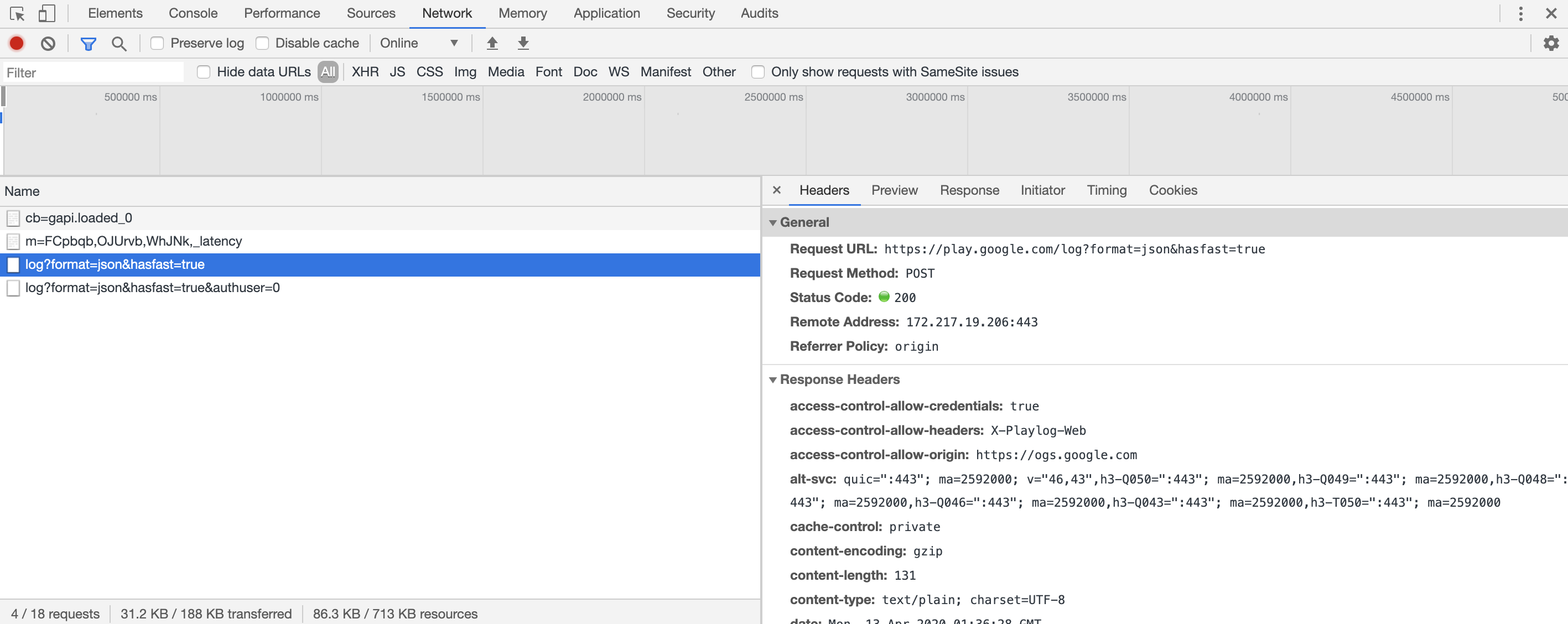
As an exercise, try to get familiar with HTTP. Navigate to different websites and observe the requests sent by your browser. Don’t hesitate to consult HTTP documentation whenever you don’t understand something.
Check your understanding
Four short questions. Work out your answer before opening each one.
When you click a link on a page, which HTTP method does your browser use?
GET. It is the default HTTP method used when your browser follows a link.
What does this response indicate?
You click a link while browsing uphack.io and your browser sends:
GET /about HTTP/1.1
Accept: text/html
Host: uphack.io
User-Agent: Mozilla/5.0 (Macintosh; Intel Mac OS X 10_15_4)
It receives:
HTTP/1.1 404 Not Found
Content-Type: text/html; charset=UTF-8
Host: uphack.io
Cache-Control: no-cache, private
Connection: close
The page you tried to access does not exist. You can tell from the response code, 404 Not Found. Maybe the page was deleted, or there is a typo in the URL.
Where will the client be redirected?
Your browser sends:
POST /send
Referer: https://sandbox.uphack.io/send
Origin: https://sandbox.uphack.io
Content-Type: application/x-www-form-urlencoded
Accept: text/html
User-Agent: Mozilla/5.0 (Macintosh; Intel Mac OS X 10_15_4)
Content-Length: 61

name=Matt&[email protected]
And receives:
302 Found
Location: https://sandbox.uphack.io/success
Host: uphack.io
Date: Sat, 16 May 2020 01:10:29 GMT
Cache-Control: no-cache, private
The Location response header names the URL to redirect the client to, so the browser will go to https://sandbox.uphack.io/success.
What does this response mean?
Your browser sends:
GET /profile HTTP/1.1
Host: sandbox.uphack.io
User-Agent: Mozilla/5.0 (Macintosh; Intel Mac OS X 10_15_4)
Accept: application/json
Authorization: Bearer abc123xyz
And receives:
HTTP/1.1 401 Unauthorized
Content-Type: application/json
Host: sandbox.uphack.io
Cache-Control: no-cache, private
Connection: close

{ "error": "Authentication required" }
401 Unauthorized means the request requires authentication. The server is refusing to process it because the Authorization token provided is invalid, expired, or missing the required permissions.
Conclusion
As an ethical hacker, it is essential to understand the HTTP protocol and how it works. Editing those requests to change how an application behaves comes later; for now, make sure you have an in-depth understanding of the basics. This post is an overview rather than technical documentation, so take a look at the following resources to broaden your knowledge:
- Http: The Definitive Guide
- RFC 9110 HTTP Semantics: methods, status codes, headers, authentication, conditional and range requests
- RFC 9111 HTTP Caching
- RFC 9112 HTTP/1.1: message syntax and connection management
- RFC 9113 HTTP/2
- RFC 9114 HTTP/3
- RFC 8615 Well-Known Uniform Resource Identifiers (URIs)
- RFC 6266 Use of the Content-Disposition Header Field in HTTP