

How do systems make sure the right people get in, and the wrong ones stay out? In this post, we’ll dig into authentication (proving who you are) and authorization (what you’re allowed to do). They’re simple ideas, but they have a massive impact on security.

So far, we mentioned access controls as a mechanism to ensure the integrity and confidentiality of data, but we didn’t get into much detail. In this post, we will discuss several important aspects of access controls and how they guide almost every interaction that we have with the technology. Let’s get started.
Access controls are one of the core security mechanisms of the modern world. And when we say security, we don’t refer just to computer security, but to any imaginable type of security. Actually, this mechanism is so fundamental that you’ve been dealing with it your entire life, but you just didn’t know it.
- Getting into your house
- Getting into your car
- Sending a message on social media
- Withdrawing money from an ATM
These are just several actions that people do daily (more or less), and they are all protected by some form of access controls. But what exactly are these access controls?
An access control is a security mechanism that controls access to systems and resources. Their purpose is to protect information from being accessed, deleted, or modified, intentionally or accidentally, by those who are not authorised to do so.
What you need to remember about this mechanism is that it has two components – authentication and authorization. To get a good picture, let’s take a simple real-life example.

This is Matt, an undergraduate Computer Science student at *insert here a cool university name*. Before his first uni day, Matt received an email telling him to go to the Student Hub to get a student access card, and so he did.
At the reception, he was asked to provide an ID to confirm he is indeed Matt. In minutes, Matt received a student card. He can use it to access university buildings and confirm his student status. All he needs to is to swipe his card at the checkpoint before entering a study room, and he’s in.
While exploring the building, he comes across a lab accessible only to university staff.

Well, Matt is, let’s say, a curious person, so he tried to enter this room even though he is not part of the staff. Of course, his access was rejected, and the door didn’t unlock. This is an example of authorization. Although Matt had a valid card, the system checked if he has the privileges to access the lab. A lecturer, for instance, may have a different access card with a higher level of authorization.
Access controls are just like that in the digital world as well. Whenever you visit a web application, you are asked to log in to confirm your identity. That is the authentication process. Next, the web application decides which features you have access to. For instance, if you have a free account on a video streaming platform, you may not have access to specific videos or high-quality format. That is authorization.
Now, based on this example, let’s try to define authentication and authorisation.
What is Authentication?
In simple terms, authentication is the process of verifying whether a user is who he claims to be, based on a single or multiple authentication factors. An authentication factor can be:
- something that user knows (e.g., password, PIN, Secret answer)
- something that user owns (e.g., ID card, security token, digital signature)
- what user is (e.g., face recognition, retina scan, fingerprint)
Authorization
While often confused, authentication and authorization are totally different concepts. Authorization has nothing to do with verifying a user’s identity. Instead, it is concerned with the privileges that a user has. More specifically, it determines if a user can or cannot access, read, modify, insert, or delete a resource. The privileges of a user are usually defined in an access control policy, as shown in Figure 3.
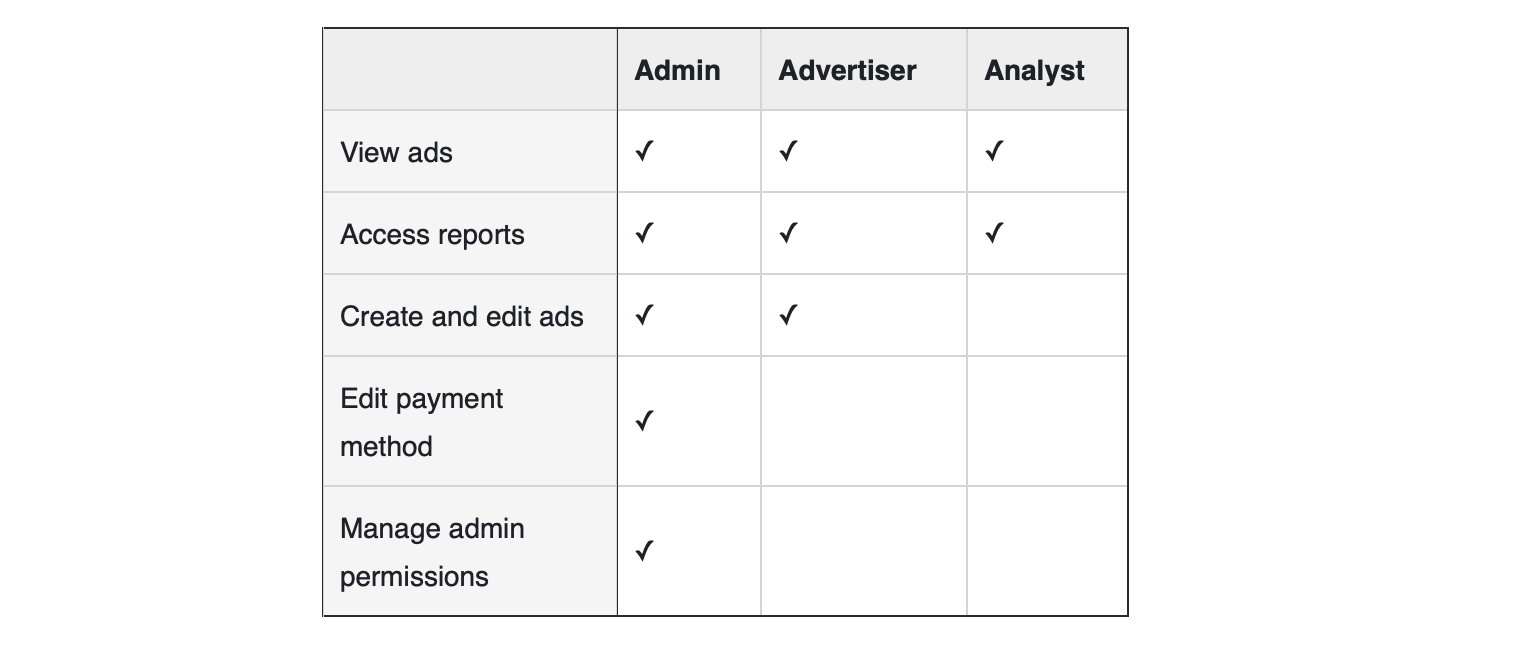
For its ads platform, Facebook has a role-based access control policy. If the user logs in as the administrator of a Facebook Page, he will have access to all the features (e.g., view ads, access reports, etc.). However, if the user has been assigned the role of Analyst, he will be able only to view ads and access reports.
How authentication and authorization work together
As we said previously, the verification process determines the privileges of a user based on policies and rules defined by the developer. Figure 4 illustrates the authorization workflow for the example with Matt:
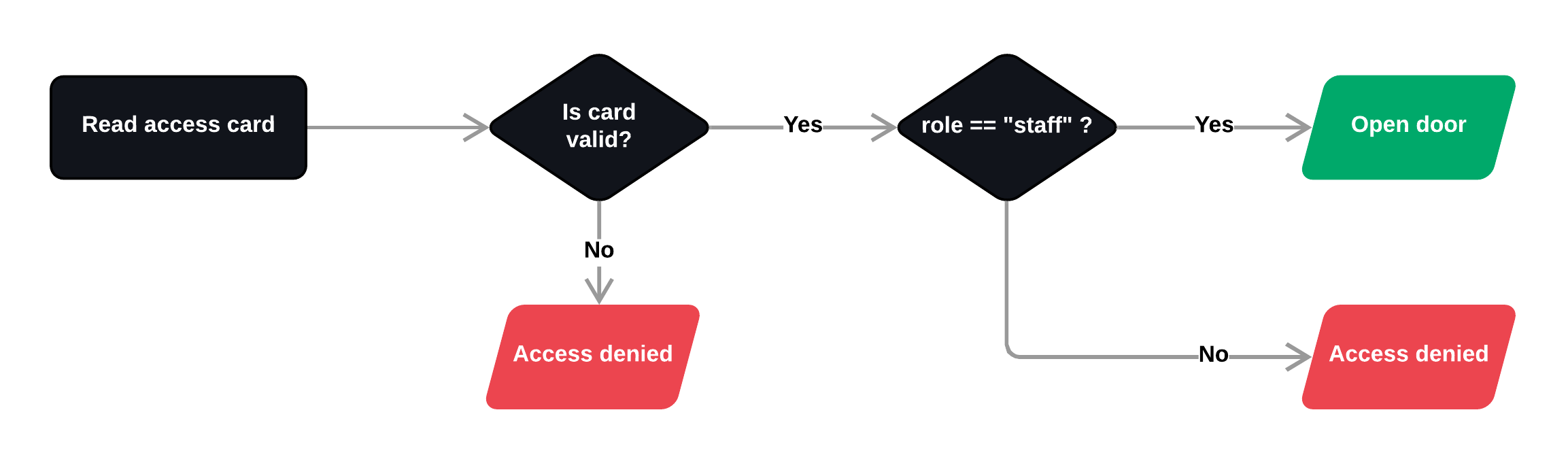
First, the checkpoint reads the data from Matt’s card and validates authentication. If the card is valid, the system fetches the access control policy for that specific door. Within this particular case, the condition to open the door looks like this:
if user.role is "staff":
  // open door
else:
  // access denied
Since Matt doesn’t meet this condition (his role is student and not staff), the access is not permitted.
Conclusion
In summary, access controls are fundamental security mechanisms to ensure the confidentiality and integrity of data. Authentication answers the question “who are you?”, verifying that users are who they claim to be, while authorization answers “what can you do?”, determining the level of access they’re permitted once inside. The two work hand in hand, neither is sufficient on its own.
Getting these basics right is a great first step, but they don’t exist in isolation. Access controls are most effective when they’re backed by sound security thinking. For example, granting users only the access they need to do their job, making systems secure out of the box, and building multiple layers of defence so that no single failure becomes catastrophic.
These ideas have names, and they’re worth knowing. In the next post in this series, we’ll explore fundamental security principles. We’ll discuss things like least privilege, secure by default, shift left, and defence in depth, and look at how they provide the thinking framework that ties everything together.